
Platform
WASPL shows that the framework can be built.
WASPL is an open-source platform for digital assessment. It is a demonstrator, not the subject of this site: the place where the framework is put into practice, and where AI features are tested before we recommend them.
From the curriculum to the assessment plan
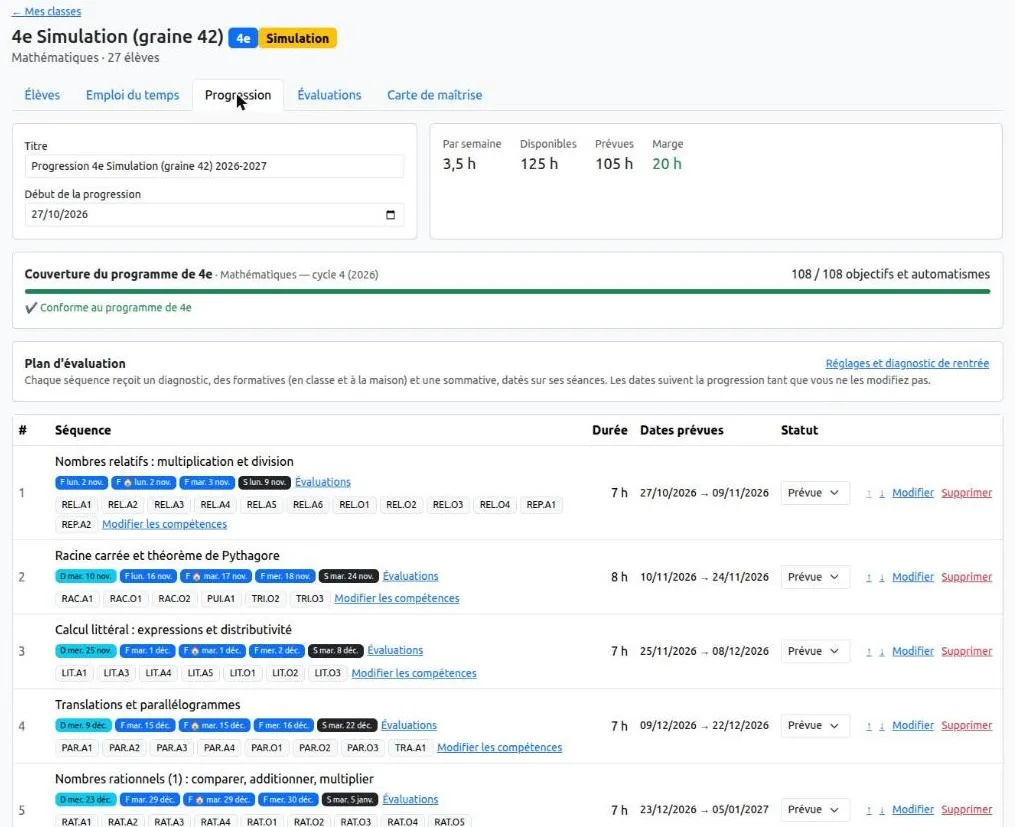
A teacher does not think in tests and sessions, but in classes, curriculum, progression, students and difficulties. wasplteacher starts from there.
- Curriculum
- The official curriculum is imported, reviewed in a workshop and put into service. Each competency can declare its prerequisites.
- Progression
- Versioned progression templates are placed on the class timetable. When a template is revised, the change is passed on to the classes that use it.
- Assessment plan
- Each teaching sequence receives a default assessment plan, dated on the real sessions of the timetable.
- Items
- For each assessment, items are proposed from the item bank against a specification table. What is missing is flagged, with ways to fill the gap.
- Mastery
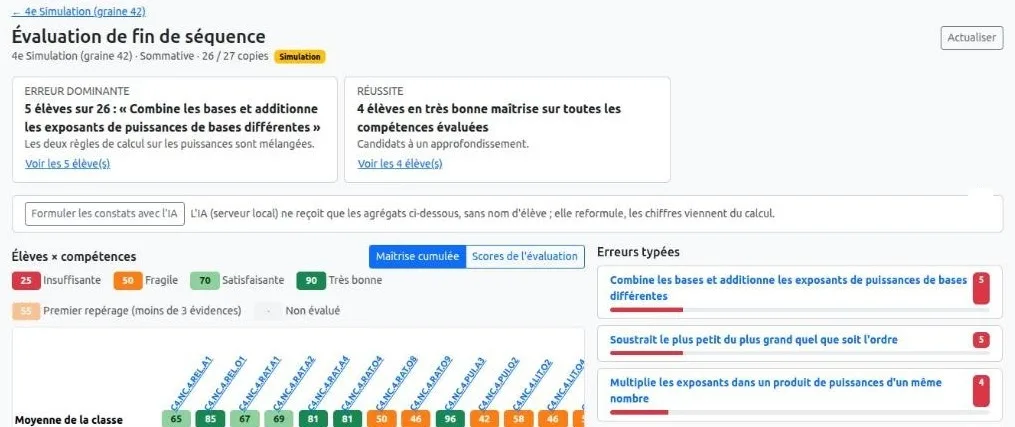
- Results become evidence. Mastery of each competency is calculated over time, from several pieces of evidence, not from a single test.
- Typical errors
- A catalogue of typical errors, linked to the competencies. Wrong answers are typed, not just counted.
The first curriculum in service is French lower-secondary mathematics (cycle 4, 2026 curriculum), with a progression template for the second year of the cycle.
The formative loop the platform supports
An error is information: it reveals a representation, a procedure or a missing piece of knowledge. A result without a proposed action is a need not yet met.
- Step 1ObjectiveA competency of the curriculum, placed in the calendar.
- Step 2AssessDiagnostic, formative or summative.
- Step 3DiagnoseWhat is mastered, which error, and why.
- Step 4RemediateA resource, a targeted exercise, a needs group.
- Step 5ReassessCheck the effect of the remediation.
A default assessment plan for every sequence
Over a year of fifteen sequences, a class needs dozens of assessments. WASPL proposes them; the teacher decides.
- Year diagnostic
- First week of the year: the prerequisites of the year.
- Short diagnostic
- First session of a sequence: its prerequisites, in four to six items.
- Formative flash
- Around the first third of the sequence: key automatic skills and the first objective.
- Homework
- Between two sessions, with several attempts allowed.
- Formative review
- Around two thirds of the sequence, targeted on the errors observed.
- Summative
- Last session: all the objectives, plus a review of earlier sequences.
- The proposal is a draft. The teacher sees every item, and can replace, remove or lock it.
- Rules first, AI in support. A plan can be produced without AI.
- Nothing is published without the teacher’s validation.
- The plan follows the progression. Moving, extending or revising a sequence redates and recalculates its assessments.
One application per role, one shared database
Each application serves one role. They share the same data, so an item written once can be proposed, taken, marked and analysed.
- wasplteacher
- The teacher’s daily entry point: classes, curriculum, progression, assessment plan, mastery and remediation. It coordinates the other applications rather than duplicating them. In development.
- waspleditor
- Authoring: items and tests, the item bank, students and groups, publication of tests and their results.
- waspltestrunner
- Delivery to students, in exam, learning or training mode, with an interface in six languages.
- wasplcorrector
- Correction for markers and supervisors: assignment of scripts, annotation, grading, AI-assisted marking of written and visual responses.
- wasplagentic
- Simulation: virtual students of different levels take the tests, to calibrate items and analyses before real students do.
- wasplstudent
- Coming next: the student’s personal space, across all subjects, as described in the framework.
AI under the teacher’s control
Every AI task is configured, switched off by default, and enabled by the administrator.
Proposals, never decisions
AI proposes, the teacher validates, and everything is traced. Rules produce a complete assessment plan without AI; AI refines, completes and explains it.
Local by default
Tasks that touch student data run on local models, and names are pseudonymised. A remote service is accepted only to extract a public curriculum.
Generating items for a gap
For a missing item: the competency, the level, a difficulty band and the validated typical errors. Each draft is checked; nothing enters the bank without the teacher’s agreement.
Tagging and annotating
AI proposes links between existing items and the curriculum, and annotates the distractors of multiple-choice items with typical errors.
Targeting a formative assessment
Using class aggregates only, never names, AI redistributes the items of a formative assessment towards the competencies that need it most.
Marking text and images
In wasplcorrector, written answers are marked against the rubric, and drawings and diagrams are read by a vision-language model, under human review.
The talk Trusting AI in Digital Assessment explains why these features rely on specialised agents, one task at a time.
Interactions built on one common interface
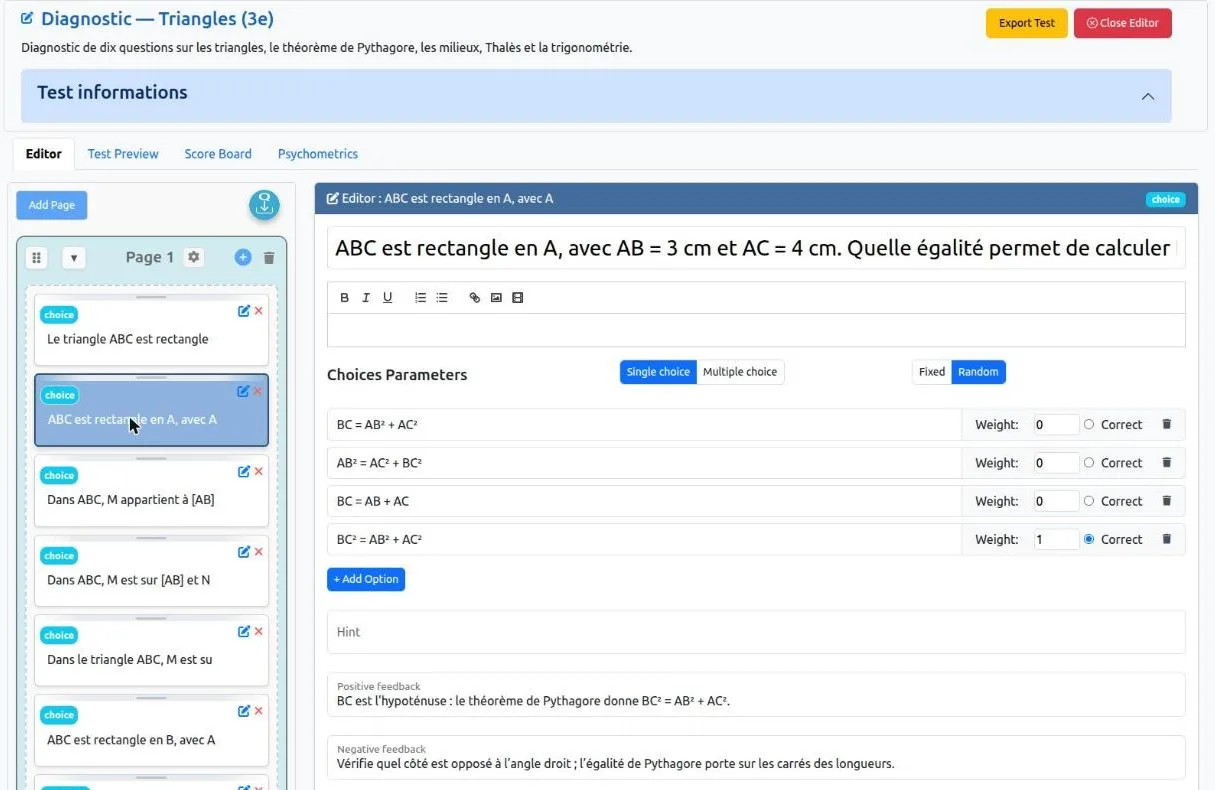
Each interaction has an editor and a renderer. New types, including custom components, are added the same way.
- Choice
- ChoiceBlock
- GraphicChoice
- Match
- Order
- Pairs
- TextGap
- TextPuzzle
- HotSpot
- ShortAnswer
- RichText
- Drawing
- GeoGebra
- Message
Items are stored as JSON, a modern web standard, in the spirit of QTI. Choice items can be imported from QTI. Content stays readable, exportable and reversible, as the framework’s principles require.
Installed in your institution, under your control
WASPL runs on your own server, with your data.
- Docker. MongoDB, the applications and an NGINX proxy start together, in development or production mode.
- Licence. Free software under the GNU Affero General Public License, version 3. A commercial licence is available for proprietary uses or specific integrations.
- Status. Pre-alpha: under active development, not yet production-ready.
The code is public on GitHub, always in its latest version.How to install WASPL.